Skip to content
GREEN, nba2k26cheat.org

NBA 2K26 Cheats for Windows

NBA 2K26 Park and Rec punish late releases, bad spacing, and blown stamina. Auto Green sits in main options alongside unlock toggles and badge display. This Windows menu covers auto green timing, main options, attributes changer, misc configs, and a streamproof overlay. Monthly is $35 for 30 days. Lifetime is $150 with no renewal. Check Status before checkout.

Checkout

GREENCurrent build is listed under GREEN.
  • Monthly$3530 days of access. Good way to test the loader on your PC.
  • LifetimeNo renewal$150One payment with no renewal. Same menu as monthly.

Lifetime pays off after about five months of $35 renewals.

Buy NBA 2K26 Cheats

Digital delivery. Same menu on both plans.

IN GAME SCREENSHOTS

NBA 2K26 gameplay in Theater, Park, and online modes. Swipe or use the arrows to browse.

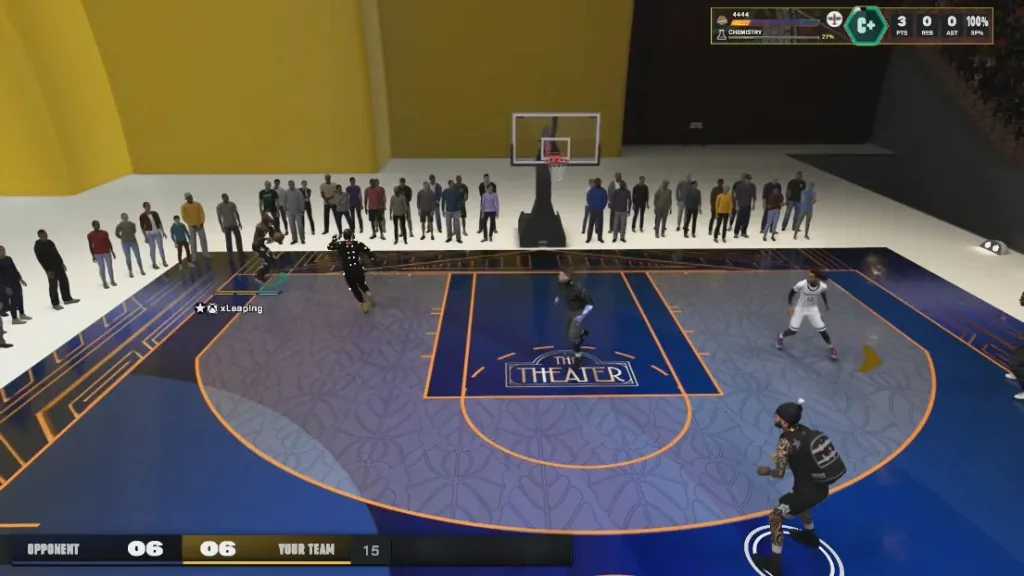
NBA 2K26 Theater mode 3v3 game with scoreboard and players on a custom court.

1 / 5

Product overview

What you are buying, what the label covers, and where to read next.

One menu, both prices

Main options with Auto Green and unlock toggles, attributes with 20 rating sliders, misc with saved configs and streamproof overlay, and every published control share the same build. Monthly covers 30 days. Lifetime is one payment with no renewal.

Only what is listed

If a switch is not named on this page, it is not in the menu. The feature pages explain each one.

Check Status first

GREEN means you can load. RED means wait. A patch can change the label even if your key is still valid.

Setup after you pay

The system requirements guide covers PC checks. Forum threads on features and delivery come next. Support is for when those do not fix it.

Status label

The Status page is the current label. The purchase card shows the same label.

Open Status page

GREEN

Current build is listed under GREEN.

What the label is not

GREEN is not a promise the light stays GREEN after the next patch, and it says nothing about your account. The buyer's guide covers the risk of using cheats.

Major features

Three modules on one menu. Streamproof mode is meant to keep menu drawings off common capture outputs. Open a module page for sections, FAQs, and control detail.

All features compared

Auto Green on the shot meter, plus unlock toggles for clothes, animations, equipment, and max badges visible to everyone in Park and Rec.

Sliders for every major rating: shooting, playmaking, defense, rebounding, and athleticism. Change your build without grinding badges in MyCareer.

Create, load, save, and delete named configs, plus a streamproof overlay that keeps labels and the menu off captures.

Every control in your license

Monthly and lifetime include all 31 published controls. Tap a name to jump to that control on the module page.

Auto Green (Timing), Unlock All Clothes, Unlock All Animations, Unlock All Equipment, Max Badges (Visible to Everyone)

Close Shot, Driving Layup, Driving Dunk, Standing Dunk, Post Control, Mid Range Shot, Three Point Shot, Free Throw, Pass Accuracy, Ball Handle, Speed With Ball, Interior Defense, Perimeter Defense, Steal, Block, Offensive Rebound, Defensive Rebound, Speed, Agility, Strength, Vertical

Create Config, Load Config, Save Config, Delete Config, Streamproof overlay

Compatibility and requirements

Match the line before you pay. Lifetime does not widen the list.

Published requirements

Operating system
Windows 10 or Windows 11
Processor
Intel or AMD
Memory
8 GB RAM minimum
Graphics
Dedicated GPU
Game
The current NBA 2K26 build on your PC
Security
HVCI, Core Isolation, TPM, and Secure Boot left on
Hardware
Cloud DMA required for full functionality on supported builds
Delivery
Digital license to the email used at checkout

Listed as supported

  • Windows 10 and 11
  • Intel or AMD
  • 8 GB RAM minimum
  • Dedicated GPU
  • Current NBA 2K26 build
  • HVCI and Core Isolation on
  • TPM and Secure Boot on
  • Cloud DMA on supported builds

Not on the requirements line

  • macOS, Linux, or consoles
  • Outdated or unsupported game builds
  • Integrated-GPU-only PCs without a dedicated GPU
  • Virtual machines and cloud-streamed sessions
  • ESP-only or timing-only license tiers

Monthly vs lifetime

Same full menu on both plans. Monthly runs 30 days. Lifetime is one payment with no renewal.

  • Main options, attributes, misc, and streamproof overlay
  • All published controls on both plans
  • Digital delivery to your order email
  • Same Windows requirements

Lifetime pays off after about five months of $35 renewals.

Try monthly

Monthly

$35

30 days of access. Good way to test the loader on your PC.

  • You have not run the loader on your PC yet
  • You want the lowest upfront price before a bigger buy
  • You might take long breaks and not renew right away
Buy Monthly

Lifetime

No renewal

Lifetime

$150

One payment with no renewal. Same menu as monthly.

  • You plan to keep playing Park or Rec this season
  • You prefer one checkout instead of renewing every 30 days
  • After five $35 renewals ($175), lifetime at $150 costs less for the same menu
Buy Lifetime

How to buy and set up

Checkout is digital. The delivery note has the loader. The menu opens with Insert unless the note says otherwise.

Requirements thread
  1. Read the Status label

    Open the Status page before you pay and again before you load. GREEN means the current build is listed for load. RED means wait.

  2. Check your PC

    Windows 10 or 11, Intel or AMD, 8 GB RAM minimum, a dedicated GPU, and the current NBA 2K26 build. Leave HVCI, Core Isolation, TPM, and Secure Boot on. Cloud DMA is required for full functionality on supported builds.

  3. Pick a license length

    Monthly is $35 for 30 days. Lifetime is $150 once with no renewal. Pick monthly for a short test run on your PC, or lifetime if you already know you will keep playing Park or Rec.

  4. Checkout and delivery

    Pay on checkout. The delivery note goes to your order email with loader access. The menu opens with Insert unless that note lists a different key. Only use the file from your own order.

  5. First load and setup

    Game open, label on GREEN, one load, then open the menu with the key from the delivery note. The requirements thread covers PC checks. The buy and delivery thread comes before support if something fails.

Support and refunds

Work through the requirements and buy and delivery forum threads before you use the support link in your delivery email.

Contact support

What to send support

  • Order id from checkout
  • Windows 10 or 11
  • Whether the label said GREEN or RED when you tried
  • Whether the problem is delivery, the loader, or the menu

The not working fixes guide covers loader and menu problems in order. Support wants the checklist above.

Refunds and risk

A missing delivery or a long RED window during your license can qualify on the Refunds page. Bans and gameplay outcomes do not. The Terms of Use and the buyer's guide state the anti-cheat risk in plain words.

Related resources

Feature pages, guides, and blog posts that go deeper than this checkout page.

NBA 2K26 Cheats product FAQ

What the menu includes, streamproof overlay, setup, and what to check after a game update.

What are NBA 2K26 cheats?

NBA 2K26 cheats are a Windows menu for the current build with main options including Auto Green timing and unlock toggles, an attributes changer with 20 sliders, saved configs, and a streamproof overlay.

What features are included with NBA 2K26 Cheats?

The published menu includes main options (Auto Green timing and unlock toggles), attributes changer sliders, config create/load/save/delete, and streamproof overlay. Monthly and lifetime include the same feature set.

Does this work on the current NBA 2K26 build?

Compatibility follows NBA 2K26 patches. Check the Status page for the current GREEN or RED label before you load, especially after a major update.

Monthly vs lifetime: what is the difference?

Monthly is $35 for 30 days of access. Lifetime is a one-time $150 payment with no renewal. Both include the same published feature set.

Can I customize the NBA 2K26 cheat settings?

Yes. The config system lets you create, load, save, and delete named profiles. Most players keep one Park setup and one Rec setup instead of retuning every session.

Does NBA 2K26 work after game updates?

Game updates can change compatibility. Check the Status page for the current GREEN or RED label before you load after a major NBA 2K26 patch.

All questions